Globalize Your Stream with Palabra API Stream Translate Solution

Broadcast to a worldwide audience with real-time, AI-powered live stream translation. Deliver a native, multilingual experience with a powerful live stream translator embedded directly into your video player.

Compatible with
Youtube logoVimeo logoOBS logoCastr logovMix logo
And more...

One platform. Two ways to use live stream translation

Build your own multilingual product with our speech translation API, or start translating instantly with ready-made tools - all powered by the same low-latency infrastructure.

For content creators & broadcasters
Start instantly. Connect your stream and go live in minutes with Palabra Broadcaster – the easiest livestream translator and stream translator available. No plugins, no IT team, no code.
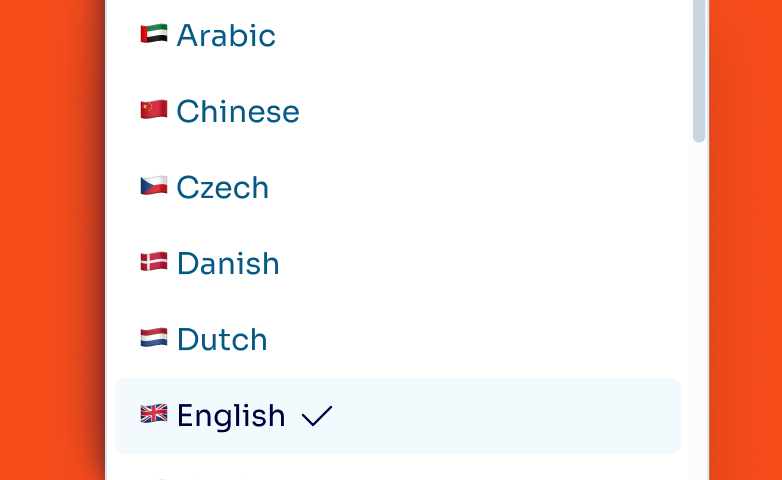
60+ Languages & dialects
<1s Translation latency
10× Audience reach potential
For content creators & broadcasters
For platform builders
Embed a real-time translating live video stream experience directly into your product. Use our API to build a fully native streaming video translator via WebRTC or WebSockets, keeping your user experience.
60+ Languages & dialects
<1s Translation latency
10× Audience reach potential
For platform builders

Everything included into live streaming translation

Keep your data secure
We encrypt every conversation and don’t store your data to ensure complete confidentiality.
Use human voices
No robotic voices – clone your own or use ours, modeled after professional interpreters.
Identify each speaker and voice them separately
Palabra uses AI diarization to detect who is speaking and assign a unique or cloned voice, so every speaker sounds distinct.
Stream smoothly even with limited connectivity
Palabra is built for live event streaming, even in tough locations. With just 10–20 Kb/second bandwidth, it keeps translations running smoothly without slowing down your broadcast.
Count on reliable support
Any user can get support by email at [email protected] during business hours. Enterprise customers get a dedicated manager and a technician for live streams.
Real-time translated captions
Captions are active by default. Palabra pushes subtitles instantly, enabling seamless translate live streaming experiences without extra setup.
Ready-to-Use listener widgets
Launch instantly with a branded iFrame or standalone page. Deliver a complete translate stream experience with built-in playback and language switching.
Professional audio ducking
Maintain the “live” feel. Our engine automatically balances original and translated audio for a natural live stream translate experience.
Integrate into your streaming workflow
Palabra supports SRT and RTMP protocols, ensuring full compatibility with leading video platforms and production tools.
YoutubeVimeoOBSCastrvmix
And more!

Native multi-audio support

Keep viewers engaged in your player. Users can switch between the original audio and live stream translated audio without leaving the stream.
Use human voices

Live stream translator security you can trust at enterprise scale

Palabra API is built for enterprise-scale live streaming translation deployments. Every stream is encrypted end-to-end.

Fully encrypted
All audio streams and translation data are fully encrypted. No plaintext audio ever touches our infrastructure.
Zero data retention
We does not store any conversation data. Each session is processed in memory and discarded, nothing is logged or saved.
GDPR compliant
Palabra operates as a data processor under GDPR. With zero data retained post-session, there's no stored personal data to manage.
Start a 7-day all-access free trial and see how easy translation can be
Try for free

Key features that make Palabra the most complete streaming video translator
Custom Glossaries

Custom Glossaries

Upload term lists before a session starts. Ensure that product name or technical acronym comes through correctly every time.
Auto-Language Detection

Auto-Language Detection:

Allow creators to switch languages mid-stream. The engine detects the change automatically and adjusts the translation target on the fly.
Intelligent Diarization

Intelligent Diarization

Perfectly handle multi-person podcasts. The API distinguishes between different voices on the same stream for clear translation.
60+ Languages & Dialects

60+ Languages & Dialects

Go truly global with support for over 60 languages. Palabra API provides instant coverage for all major markets.

What real users say about our live streaming translation

Trusted by organizers and platforms worldwide
Brian Vertone
Brian Vertone
General Manager at Walcon Virtual

“We used Palabra during a recent metaverse event hosted on Walcon Virtual, and it added great value to the experience. The live translation helped us reach a broader audience and made the event more accessible”

Meg Hsieh
Meg Hsieh
Sales Manager at GIS Group

“We like Palabra interpretation as either in Chinese or English, the translated speech is more concise and coherent, making it easier to either read or listen to. Also, Palabra is able to detect language change and yield corresponding interpretation. This is good if we use it during a fireside discussion.”

Livestream translator for content creators & broadcasters

Stream to a global audience without rebuilding your setup

Palabra Broadcaster lets you translate live streaming content into 60+ languages directly from your browser, making it the simplest live stream translator for creators. Setup in 3 steps:
1.
Create Your Stream
Click Create Stream, give it a name, and choose your input type (RTMP/SRT for OBS or Microphone/Camera for direct streaming).
2.
Set Languages
Select the speaking language (or multiple source languages) and choose the target languages for translation.
3.
Configure & Go Live
Review your stream settings (routing, translation, audio) and start your real-time live stream translation instantly.
For platform builders

Ship real-time translating live video live stream inside your platform

Give your users real-time translating live video live stream in 60+ languages, embedded natively in your player. Palabra API combines speech recognition, translation, and voice synthesis into a single pipeline - enabling a fully scalable streaming video translator solution.

How Palabra fits your platform architecture:
Audio Input Stream
Multi-Speaker Diarization
Auto Voice Cloning
Custom Business Glossaries
60+ Language Engine
JavaScript SDK Integration
Memory-Only Processing
Palabra API Core
<1s Global Latency
99% Detection Accuracy
Native Integration
60+ Languages Available
Zero-Cost Scaling
Emotion Transfer
(Coming soon)
Zero Data Retention

Three steps to first translated live stream audio

1

Get your API credentials

Sign up and receive your Client ID and Client Secret from the Palabra dashboard.
2

Install the SDK

Available for JavaScript, Python and Java. Compatible with any platform using WebSockets or WebRTC.
3

Configure languages & go live

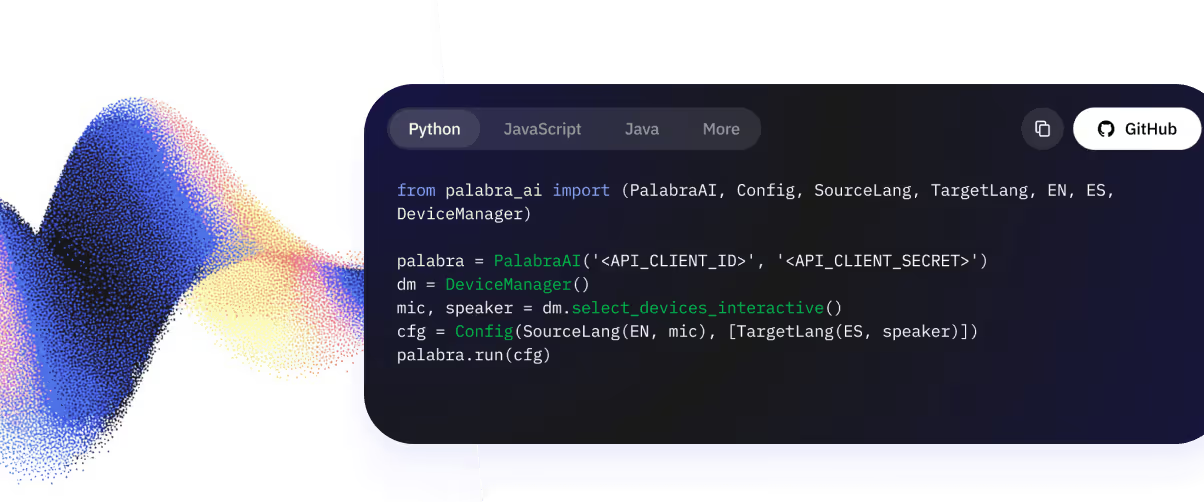
Set source and target languages, connect your audio track, and call client.connect(). Start your live stream translate pipeline in seconds.
from palabra_ai import (PalabraAI, Config, 
SourceLang, TargetLang, EN, ES, DeviceManager)

palabra = PalabraAI('<API_CLIENT_ID>', '<API_CLIENT_SECRET>')
dm = DeviceManager()
mic, speaker = dm.select_devices_interactive()
cfg = Config(SourceLang(EN, mic), [TargetLang(ES,speaker)])
palabra.run(cfg)
Python Palabra SDK
import { PalabraClient, getLocalAudioTrack } from '@palabra-ai/translator';

const client = new PalabraClient({
auth: {
clientId: 'YOUR_CLIENT_ID',
clientSecret: 'YOUR_CLIENT_SECRET',
},
translateFrom: 'en', // Source language code
translateTo: 'es', // Target language code
handleOriginalTrack: getLocalAudioTrack, // Func returning a MediaStreamTrack
});
JavaScript Palabra API Client
import ai.palabra.*;
import ai.palabra.adapter.*;

public class TranslationExample {
public static void main(String[] args) {
// Initialize client with credentials
String clientId = System.getenv("PALABRA_CLIENT_ID");
String clientSecret = System.getenv("PALABRA_CLIENT_SECRET");

PalabraAI client = new PalabraAI(clientId, clientSecret);

// Configure translation
Config config = Config.builder()
.sourceLang(Language.EN_US)
.targetLang(Language.ES_MX)
.reader(new FileReader("input.wav"))
.writer(new FileWriter("output.wav"))
.build();

// Run translation
client.run(config);
}
}
Java Palabra API Client
Palabra API is compatible with any programming language that supports WebSockets or WebRTC protocols. Use our API Direct Integration solutuon to create integration with your server-side or client-side applications.
Learn more

Answers you might need

How does real-time live stream translation work?

Palabra live stream translation works the following way:

  • Connect your stream input and output to Palabra Broadcaster.
  • On your live stream, viewers pick a language option.
  • Go live.
  • Palabra securely captures the speaker’s audio.
  • Our proprietary LLM transcribes and translates speech into 60+ languages.
  • Viewers hear audio or read captions in their chosen language.
Can the translator handle both audio and captions during a live stream?

Palabra streaming video translator can handle both audio and captions during a live stream. Contact our team if you need help setting this up: [email protected].

Is the translation delay noticeable to viewers?

No, delay isn’t noticeable to viewers. Palabra delivers two-way automatic translation with under one second of latency.

Does the AI translator require any special software or a live stream translation extension to work?

No special software or extension is required to use Palabra AI translator. Easily integrate Palabra with your streaming platform using our iframe widget or API for custom setups.

How secure is the data during live video translation?

Security is a top priority. All live streams processed by Palabra are encrypted. Critically, we do not store any conversation data, ensuring total privacy for your broadcasts.

Is there a limit to the number of viewers who can access translated streams?

Palabra has no limit on how many viewers can access translated streams.

How does your service ensure translation accuracy in real time?

Palabra.ai ensures real-time translation accuracy by understanding context and using niche terms you add through glossary settings. To guarantee stream translation quality, every product update passes automatic benchmarks and a final review by professional interpreters.

Can the live stream translator handle multiple speakers at once?

Our live stream translator supports multiple speakers at once, even if they switch languages. Contact our team if you need help setting this up: [email protected].

How to translate a YouTube live stream?

You can translate a YouTube live stream using Palabra Broadcaster. Copy your YouTube stream key, paste it into Palabra, select your source and target languages, and go live. Palabra handles the real-time speech-to-speech translation and delivers translated audio and captions to your audience instantly. No plugins or software installs required.

How to translate a live stream?

To translate a live stream with Palabra: connect your stream via RTMP, SRT or direct browser input; select the language being spoken and the languages you want to translate into; then go live. Palabra's AI translates speech in under one second and delivers native-language audio directly inside your video player. It works with OBS, streaming cameras, and any RTMP-compatible setup.